
Sprint 4 - Permacheck
Particle Effects & Overlay Materials
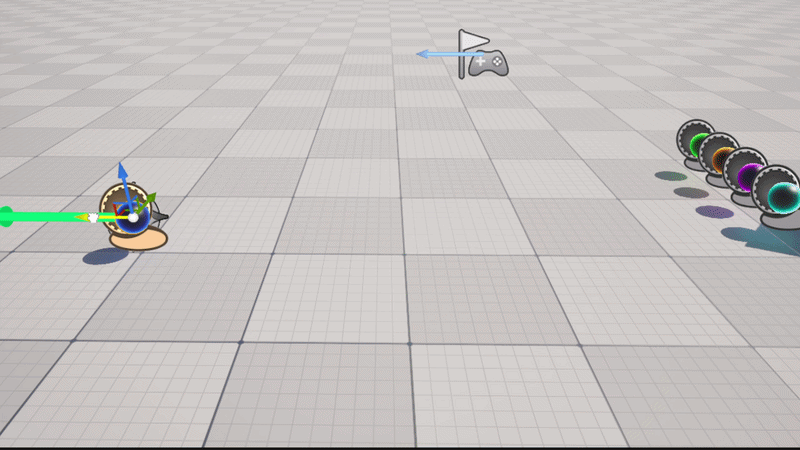
For sprint 4, I really started to kick into gear and get into the flow of working on PermaCheck. Since my role is a flex artist, I was assigned all cards related to creating particle effects and visual effects. I haven't worked much previously on particle effects and Niagara in Unreal, but I knew I would be able to learn how to do some interesting things with it, and I went in fairly confident of my ability to learn this new system. It started off a bit difficult, and for my first task, I opted to utilize overlay materials instead of a particle system to achieve a glowing effect for the player's projectiles. With some light research, I discovered that you can create translucent materials in Unreal, and with the node editor, you can create adjustable parameters to control the power of the materials opacity as well as the color of the material. You can also add emission to these materials to add to the glowing effect and give it some luminosity. By using these materials as an overlay, they seamlessly lay on top of any pre-existing materials set to a mesh, and it automatically lines the edges with a nice glow. I made several instances of my base material with different colors so that each tower's projectile was easily visually distinguishable from one another.

Once I finished this initial task, I moved onto properly beginning to learn Niagara. I began by making the tower spawn effect. I wanted to make sure this effect was easy to understand at a glance, and I envisioned it as a glowing ring around the base of the mesh that would fade away once the mesh was spawned in. Using my research knowledge, I was able to begin with a blank preset in Niagara and flesh it out with parameters, slowly but surely. I learned how the emitter state worked and how to set the options for looping. I also learned about spawn rate, particle initialization, using shape locations, velocity, and aligning the sprite to a mesh. Using this new knowledge, I was able to create a particle emitter that set up a flat ring of particles that would initialize and then fade away. I was also able to set it up so that it would align itself with its parented mesh so that it would always be in the right place.

Once I finished this first effect, I created the enemy damage effect. For this one, I created an emitter that spawned a burst of particles going outward from a central point and then fade away the longer their lifetime goes on so that they disappear by the end of the loop. I also made a simple custom particle sprite so that it's easy to tell that what is happening. I kept it simple due to the scale of the enemies on screen and how small the overall physical screen will actually be in the hands of players.

Moving on from there, I made the player damage effect. This one is very similar to the enemy effect, so I was able to reuse a lot of aspects of that one. I also made custom particle sprites for this that differed from the enemy sprites so that it was very clearly conveyed but visually different.

I also made an effect for when the player sells a tower, which also retained a lot of the aspects from the player and enemy damage emitters, though I changed some of the fine tuning of the velocity, shape, and direction. This effect is more of a vertical burst with very little horizontal movement. This one also has custom sprites in the shape of dollar signs for visual clarity.

The most complicated effect I made for this sprint, and the one I'm most proud of, is the tower upgrade effect. I was able to make it so that there's an influx of absorbed "energy" that is then quickly expelled in a dramatic burst, accompanied with a glowing effect on the mesh itself. This effect uses two separate emitters, one for the pull inward and one for the burst. I was able to achieve an inward pull by reversing the velocity to a negative value, and I think this part in particular looks really cool. The burst is a bit more standard, using a lot of the same aspects of the pull, but having positive velocity, a spawn burst, and longer particles to make it more intense. I also added emission to the particles to make it more impactful and energetic. To get it to all play out together, I created a sequence utilizing both emitters and an overlay material that I then timed to play out at the right points. The overlay material was the hardest to figure out, because I had to add an overlay material switcher to make sure it was disabled before and after the glow appears, and then adjust the intensity while it was in play.

Lastly, I created this simple projectile trail effect. This one was probably the most straightforward to set up overall. I used a noise texture that I made translucent towards one end to give the effect of it trailing off, then used this as the particle material. The only issue with this effect is that it is quite hard to see, and this is the clearest I've been able to get it thus far. I was having difficulty trying to get colors to show up as brightly as I wanted, so I might have to do more research into how to fix that limitation.
Overall, I feel that I learned a lot about particle effects and how to create really interesting systems with Niagara, and I'm proud of what I've learned in a short time.